-->

AX 2012 R2: Prevent startup of checklists

maqk® by Maqk | 3:31 PM

AX 2012 R2: Model upgrade check list does not disappear


Subject

This post discusses a scenario when the ModelStore gets updated after applying KB hot fix. However the checklist keeps coming after it is fully completed and there is no way to make it disappear permanently.


Audience

Dynamics AX 2012 (FP, R2 R3) X++ Developers, Technical consultants, Functional consultants, and advanced users.


Background

Hot fix implementations are a regular task for developers and technical personnel alike. After any hot fix, a checklist is presented to the user mainly to recompile the whole application and synchronize. The checklist depends on the type of upgrade and can be of the following type


Problem

Sometimes however, hot fix implementation fails which can have any reason. In our scenario we faced a similar situation where we had to undo the hot fix. We simply restored the model store database. However the model upgrade checklist would keep coming.


Checklist Framework

There is a solution provided by the framework. It is the menu item provided in the Checklist section. The full navigation is: /System administration/Area page/Setup/Checklists/Prevent startup of checklists


What it does ?


Points to Action menu item: SysCheckList_InitNoUpdate
Which then calls the SysCheckList class with the base enum: SysCheckListType and SetDB as selected value. 
The main method for this base enum value provided runs the following
                case SysCheckListType::SetDB :
                    SysCheckList::initNoUpdate(true);
                    return; //mark upgrade and setup as finished


This method fires the SysSetupLog::saveEx() and SysSetupPartitionLog::saveEx() methods which updates the SysSetupLog and SysSetuppartitionLog tables with values representing the completed status for each type of checklist. These methods are called for each checklist type. This is achieved by sending the name of the class specialized for each checklist type to the save methods. Hence for each type, a complete record is maintained in the database. This gives the hint that this table is read at the client startup to evaluate if any checklist remains to be updated. See image below

SysCheckList::initNoUpdate() method body


A failed attempt


I marked all such records as completed. Nothing happened. Checklist kept coming. There is definitely more to the doings of the mentioned method which I would have missed in my update query.

The focus of this post is not to understand the SysCheckList class and its internals, neither was it my focus when trying to get rid of the checklist. So... I googled :D


Solution


SysCheckList_Update::finalizeMinorUpgrade();

The link shared in the following section provided the solution to this problem. This is why for every such problem, we should try to searching for relevant API provided in the framework.

This method actually does similar things discussed above along with deleting unwanted records from SysSetupLog table and updating the ReleaseUpdateConfiguration table. However, it does it fully and bring results.

Links


  • http://dynamicsuser.net/forums/p/76421/421256.aspx 

#AX7SERIES: Some basic terminologies and concepts

maqk® by Maqk | 12:18 PM

Terminologies and Concepts

In this post, we provide high level definitions for some basic concepts for AX7 Development. Not all of these concepts are new, so it will be a piece of cake for all AX developers.


This post will be used as a reference post for the next posts coming in  #AX7SERIES


Elements: 

Any AOT element like form or table (similar to AX2012)


Projects: 

Logical grouping of AOT Elements (similar to AX2012)

Models:  

Grouping of elements representing distributable software solution. One element can only exist in one model, not the other. Design time concept


Packages: 

New concept in AX 7. Deployment unit. Contains one or more models. Can be exported to file which can be deployed on other environments like staging or production


#AX7SERIES: Power of Visual Studio

maqk® by Maqk | 5:53 PM

#AX7SERIES: Power of Visual Studio IDE


The #AXSERIES is an attempt to cover all the new things in the development paradigm in AX7 with a difference oriented approach between the ex and new version of the ERP making it easier for the developers to jump in the new environment 


Audience

AX 7 enthusiasts, Dynamics AX 2012 (FP, R2 R3) X++ Developers, Functional and Technical consultants and advanced users


Ok I somehow managed my time to continue this blog series. I tell you what, I am not very busy actually, but still I dont know where my time goes :D

Anyways cutting the chatter, lets get straight to the point. This blog post will share some intersting things that were totally IMPOSSIBLE in AX AOT IDE thus titling this "POWER OF Visual Studio IDE"

Categorization of AOT Items

IDE provides two ways or views to see and access AOT Items


Classic view

Same old way (new color scheme due to whole new IDE though :P) illustrated as follow
AOT - Classic view


Model View

Provides a list of Models stored as default by the installation along with new models created by devs.

New option, 'Model view'

AOT in Model view

Search AOT Items

Second is the searching. Imagine how quick the access would become if you can search in the whole AOT without going to a specific node, what we call in Arabic, "Halwa" #sweat

Search in AOT - excellent!


Saving development items on local machine

Yes sir, in #AX7, you code gets saved in your local folder. You sync with AOS at later stage perhaps.
Save projects at local drive

Code windows and tabs: Beautifullll

Why I am getting so excited is due to the HUGE PLUS we will get after migrating to the VS IDE. Imagine no more scrolls and clicks in the left method list. All code for one class / table in one code window with multiple code sub tabs openable
One tab for all code belonging to a class, form or table

Enjoy links section as cool as ever

 Links


  • Link 1
  • Link 2
  • Link.... n

AX 7: #AX7SERIES X++ Devs welcome To Visual Studio

maqk® by Maqk | 2:01 PM

#AX7SERIES: Welcome To Visual Studio


Subject

This post is the first on the series of AX7 which will feature introduction and the underlying changes


Audience

Visual Studio developers, Dynamics AX 2012 (FP, R2 R3) X++ Developers, Technical consultants and advanced users


Since you know that AX7 is out for first look and demos, And the good thing for the all time old school devs is, the long awaited VS integration is here. AX 7 development is completly shifted  on Visual Studio. Now since all the old school VS Devs (including me of course) are so fond of the VS IDE (which is probably the best IDE there is), think how cool, quick and smart the work would get when its all done in VS. 

Secondly, we have some new things to learn as the framework has just been upgraded a little bit. Obviously not a very big change compared to the 2009 - 2012 transition, but not a small one either.

Take this for example, all new development artifacts would be stored on local dev machine in the form of files. Quite contrasting to AX 2012 isn't it.

With VS 2015+ as the version for development, the performance requirements have also plussed. The same is illustrated in the following snapshot taken from one of the official training videos on DLP

AX7 Development - Visual Studio requirements


To cater all this, we need a deep study of all such changes and the new things introduced. This is why we have started the new AX7 series which will cater all of this to be shared on this blog. So stay tuned #DAX7ers.

BY THE WAY Enjoy some cool links in the end


Links


AX 2012 X++: Add N working days to a date

maqk® by Maqk | 5:04 PM

AX 2012 X++: Add N working days to a date

This post provides a few tips, specially focusing the working calendar and working days


Audience: Dynamics AX 2012 (FP, R2 R3) X++ Developers, Functional and Technical consultants and advanced users


Date operations are every day common tasks for any developer working on a business application. Any good programming language, platform or framework would provide well designed library(ies) with sufficient functionality abstracted in various helper classes and methods to achieve the common and extended date operations. After all, what we want to achieve is re-usability and not reinventing the wheel every now and then.

AX also has alot of such reusable method to save time and keep consistency. A few are listed below;


  • DateTimeUtil: A date time manipulation utility class. Some of its methods are referenced below too
  • DateTimeUtil::getSystemDateTime(): Works like a Now() method
  • DateTimeUtil::addMonths(): Add n months to the provided date
  • dayOfMth(date): Calculates the number of the day in the month for the specified date.
  • mkDate(int month, day, year)Creates a date based on three integers, which indicate the day, month, and year, respectively.
  • prevYr(date) - Retrieves the date in the previous year that corresponds most closely to the specified date. Similar functions include prevMth() and prevQtr()
  • dateMthFwd(date, int qty): Adds the specified number of months to a date.

These all methods are so useful and handy while there are much more to mention. See links section for more.

We are more interested in the working calendar. I recently got a scenario in which I had to validate the date from calendar. Then I had to decide the ending date (the famous 'To' date). The resulting date must be a valid date on a calendar. So should I write some algo for it. Experience says such a thing should be available in the library / framework somewhere. Yes this is what is to be shared with all.


WorkCalendarSched.schedDate Method

This sweet method in short takes from date, no of days to add, scheduling direction, calendar id to process against and calendar days flag to schedule the resulting date, awesome. Exactly what I was looking for. Hence using this method, we can add N working days (excluding holidays, weekEnds, etc) to any date. The resulting date is guaranteed to be a working date. Just keep your calendar tight and updated

Code sample


static void job_testSchedDate(Args _args)
{
    WorkCalendarSched       workCalendarSched;
    SchedDate               schedDateFrom, resultantTODate;
    Days                    noOfDays;
    CalendarId              primCalendar, secCalendar;

    workCalendarSched = new workCalendarSched();

    noOfDays            = 30;     
    primCalendar        = "Default";    secCalendar         = "Default";
    schedDateFrom       = str2Date("21.6.2016", 123);    // dd.mm.yyyy

    info(strfmt("From date: %1", 
        date2str(schedDateFrom, 123, DateDay::Digits2, DateSeparator::Slash, DateMonth::Short, DateSeparator::Slash, DateYear::Digits4)    )); 
    // sequence (int) 123 means 1=dd 2=mm 3=yyyy
    
    info(strFmt("Adding %1 days [Working days]", noOfDays)); 
    resultantTODate = workCalendarSched.schedDate(  SchedDirection::Forward,    // Selecting backward will minus the noOfDays
                                                    schedDateFrom,  
                                                    noOfDays,                   // number of days to add
                                                    NoYes::Yes,                 // Yes mean bring WorkDays (exclude weekEnds and other configured holidays in between)
                                                    primCalendar, secCalendar); // which calendar to be used for date calculation and verification
     info(strfmt("Resultant TO date: %1", 
        date2str(resultantTODate, 123, DateDay::Digits2, DateSeparator::Slash, DateMonth::Short, DateSeparator::Slash, DateYear::Digits4)    ));  
}


Output is shared as follows


 Links

ProjUnpostedTransView-Field WorkerName is not compatible with field WorkerName

Subject


This post provides insight about a synchronize error received during full AOT for AOT view 'ProjUnpostedTransView' and its resolution.

Error

ProjUnpostedTransView: Synchronize database There is a field mismatch in the union query. Field WorkerName is not compatible with field WorkerName.

Audience:  Dynamics AX 2012 (FP, R2 R3) X++ Developers, Functional and Technical consultants and advanced users

Background

We have been facing this issue since day one of our installation of AX 2012 R3 (RTM). Build numbers are as follows;

Microsoft Dynamics AX 2012 R3 (RTM)
Kernel version: 6.3.164.0
Application version: 6.3.164.0

Problem

When synchronizing the full AOT, the following errors come


followed by...

Solution(s)

As per mentioned in the synchronize database error (1), all the errors have come in the View, 'ProjUnpostedTransView'. Exploring the same yields the composition of the view on following sub views.


  1. ProjLedgerJournalTransUnpostedView
  2. TrvExpTransDistributionsUnposted
  3. ProjJournalTransFeeUnpostedView
  4. projCustInvoiceLineDistsUnpostedView
  5. ProjJournalTransHourUnpostedView
  6. ProjProdJournalRouteUnpostedView
  7. InventJournalTransUnpostedView
  8. ProjProdJournalBOMUnpostedView
  9. VendInvoiceInfoLineDistributionsUnposted
  10. ProjOnAccTransUnpostedView
  11. ProjIntercompanyUnpostedExpView
  12. TSUnpostedTimesheetLinesAllView
  13. ProjIntercompanyUnpostedTSView
  14. ProjIntercompanyUnpostedVendInvLineView
Data sources (Views) with mismatching EDTs in their field, WorkerName


Each of these views comprise of one or more tables. And each of these views as a data source has the HCMWorker data source with in further relating to DirPartyTable to fetch the worker name. Closely monitoring each of them reveals that the following four data sources were returning null for the worker name. Obviously the logic implemented would have required the field (since a union query) to have a consistent schema returned. Further to returning null, the fields were provided the extended type, "Name" which was different from what is returned from DirPartyTable Name field which extends "DirPartyName" extended type.  

Data sources with inconsistent extended types

  1. projCustInvoiceLineDistsUnpostedView
  2. ProjProdJournalBOMUnpostedView
  3. ProjInventJournalTransUnpostedView
  4. ProjOnAccTransUnpostedView

Due to this EDT mismatch, the AOT framework was giving errors.

Providing the correct extended type of DirPartyName to the WorkerName fields for each of these views made the schema fully consistent, hence error removed.

NOTE: These corrections are to be made in each view used as a datsource and in the field section

I am unable to find if its a R3 RTM original issue or what, cause i have not been able to find any corresponding hotfix. If any of the readers have any idea, kindly share it with me.

Thanks :)

AX 2012: FormRun.createRecord Method with example

maqk® by Maqk | 10:24 AM

AX 2012: FormRun.createRecord Method with example

This post provides a tutorial about the FormRun.createRecord Method which is override able at form level for custom implementation

AudienceDynamics AX 2012 (FP, R2 R3) X++ Developers, Functional and Technical consultants and advanced users

Background

Recently I came through a scenario where I had to use a base table (supporting inheritance) as a Form data source. I needed to ensure which child table's instance is being created. Due to not being totally aware of the table inheritance implementation (and sorry for Microsoft documentation, such things are not specified anywhere) I was relying on my intelligent (or semi intelligent perhaps :D ) guesses. 

Question: Where is the InstanceRelationType field set to identify the record belonging to a child table.

Thanks to Nasheet Siddiqui | blog a close friend of mine, who guided me in the right direction. As per him, such a thing should be decided by the system at record creation method. And that is the FormRun class method: createRecord().

Example

One of the example is the PurchAgreement form, where the system decides at runtime if the agreement line is quantity based or volume based (depending on Comitment type field inrespective helper class instance). This is implemented in PurchAgreementr Form's CreateRecord method. 

createRecord() implementation at PurchAgreement form

There they have used the FormDataSource's method createType to specify exactly which child table is to be instantiated. Evaluating the commitment type member, a map is instantiated with a value pair of data source name and child table id are set. The map is then sent as parameter to 
FormDataSource > createTypes() method which takes a map in params. This method internally decides the fate of the record i.e which child table the record will belong too. Setting the instancerelationtype members are probably internal to this method.

For even better understanding of concepts, I am attaching this valuable excerpt

An excerpt from Inside Dynamics AX 2012

Traditionally, to create a record in X++ code you only had to call the FormDataSource.create method. However, that method does not let you specify the type. To support the polymorphic creation scenario, use the following method: FormRun.createRecord(str _formDataSourceName [, boolean _append = false]) All create actions performed by the kernel are routed through this method. You should use this method as well instead of the create method. The first parameter specifies the name of the form data source in which to create the record, and the second parameter contains the same append value that is passed to the create method. You can override this to put in conditional code that depends on the type being created. The call to the super of the method executes the correct logic depending on the type.

Links

SQL Server 2012: Rename a database with datafiles

maqk® by Maqk | 4:12 PM

SQL Server 2012: Rename a database with data files (MDF, LDF)

This post provides the scripts that will rename a database along with its data files.

Audience

DB Admins, T-SQL developers, Technical Consultants, AX Developers

Background

In so many scenarios, you may need to rename a database. One general scenario in AX implementation would be when maintaining multiple AX environments at one server like Staging, TEST, DEV and Production. This is also very likely in development and RnD scenarios where you keep restoring LIVE instances backups on a central backstage HUB for data availability.

Problem

For hosting multiple and different AX servers on a single machine for local availability, you need to have multiple AX server databases hosted with different names. But for that, you need to rename the database since each backup may result in the exact same database name. But you face the problem as you already have a database with exactly same name, 'MicrosoftDynamicsAX' attached to your local server. This can cause problems and you may start thinking how to restore both databases with different names cleanly without disturbing the existing database.


Solution(s)

Properly renaming existing database(s) would let you restore any database coming under the name of MicrosoftDynamicsAX. How I have resolved this issue at my local server is, I rename the existing MicrosoftDynamicsAX database (along with data file names, yes, renaming data files :) ) and the restoring the new database under the same MicrosoftDynamicsAX (or whatever) name. To restore more such instances, I can always rename databases as I like. This I achieve using the attached script. It lets me achieve the following in one go

Script process
  • Set desired database to single user mode
  • Rename database to new provided name
  • Takes the database (with new name) to offline mode
  • Suspends further execution for 5 minutes 
    • This is done so that the user is expected to rename the files manually at physical file level.
  • Renames the data files logically
  • Brings the database back to online
  • Sets the database again to multi user mode.


The script is at the moment hard coded since I was not able to provide variables to a few alter database commands due to command's nature. For this reason, the script is not plug and playable as I had to use symbols to specify the replacing database names. when using, carefully replace sample values with yours and test and master execution on test databases :)

This mess would be resolved by dynamically generating SQL and providing user provided database names and other variables to SQL. Therefore as improvement, I am writing a small utility that would enable user to select a database, provide its new name and click and all is done automatically. So stay tuned.

Script can be downloaded from the link: Database renaming script


AX 2012 R3 SSRS: publishreportcommand network name cannot be found


SSRS report deployment gives error, "The network name cannot be found."


Audience

Dynamics AX 2012 (FP, R2 R3) X++ Developers, Functional and Technical consultants and advanced users

Background

When deploying a SSRS report, you may come across the error. This error will occur while deploying report(s) through AOT as well as using PowerShell scripts.


Experience tells us that such issues may occur if service accounts (AOS, BC proxy, Workflow) are wrongly configured. In our scenario, we had to reconfigure and put the newly provided service accounts. As a result, the reporting services crashed. We made sure all the practices related to configuring system service accounts are met. However we kept getting this error. report deployment were attempted both using AOT and PowerShell

Solution(s)
Thanks to sharing, the coolest caring. we cam to know the following link that clearly mentioned the reason of this issue.

https://blogs.msdn.microsoft.com/axsupport/2013/03/13/deploying-reports-in-ax2012-you-need-access-to-the-administrative-share-c/ 

In the post, the user uses the verbose modifier in the publish command in PowerShell to get more details. That yields that a network shared location access is attempted by the script. Now the question is, if such access is available or not. As a resolution, providing the C drive (reporting services server) as network shared resource resolved the issue.

Links

AX 2012 Workflow: Function run has been incorrectly called.

maqk® by Maqk | 6:06 PM

AX 2012 Workflow: Function run has been incorrectly called.

Workflow submit ends in error notification when submitting to workflow from code

AX 2012 Workflow: Function run has been incorrectly called.

Audience

Dynamics AX 2012 (FP, R2 R3) X++ Developers, Functional and Technical consultants and advanced users


Background

At the point of submitting a workflow, the comment dilog box appears. The class, is constructed needing a table buffer. The tupple must contain a row for the active workflow. This is usually passed by the statement
args.caller().getActiveWorkflowConfiguration()
The following  listing provides a detailed context

    workflowSubmitDialog = WorkflowSubmitDialog::construct    (args.caller().getActiveWorkflowConfiguration());
    workflowSubmitDialog.run();


Problem

Our working form stopped to resolve a particular configuration for the workflow. This was pretty strange behavior as a lot of records completed different scenarios of the workflow in success. we refreshed AOT items, generated incremental and FULL CIL, restarted the service, cleared the cache, but nothing worked.

Solution(s)

This must be a configuration or framework issue as a working workflow stopped being not able to find a particular version row (which exists in the table). Several investigatory steps were carried as mentioned in the problems section but none resolved the issue.

Alternatives

The solution should be a framework refresh. The only quick alternative for us was to write an alternative i.e fetch the existing version row our self and provide it to the WorkflowSubmitDialog[C] object. We did as follows;

  • Write a custom method in [T]WorkFlowVersion that returns the buffer. The following query does the job
select firstOnly1 *
   from
workflowVersionTblBfr
    join workflowTblBfr
    where
workflowVersionTblBfr.WorkflowTable     == workflowTblBfr.RecId &&
workflowVersionTblBfr.Enabled           == NoYes::Yes           &&
workflowTblBfr.TemplateName             == _wfTemplateName    
        ;
        return workflowVersionTblBfr;
    • Call the new method in the submit method of the WorkFlow SubmitManager class once it is verified that the workflow version is not being fetched by the framework

      Method navigation: Workflow submit manager class > Submit method > add call after workFlowSubmitDialog object is constructed
    //
        if (!workflowSubmitDialog || !workflowSubmitDialog.parmWorkflowConfiguration() )
    workflowSubmitDialog = WorkflowSubmitDialog::construct(WorkflowVersionTable::T4ED_GetWFConfig
    (workFlowTypeStr(T4EDPurchPORecWFType), tableName2id(tableStr(T4EDPOProdRecConfExtWF)), recId
    ));
    //

    Note: Since you are submitting a workflow, you don't need to look for the record specific workflow version. This would be mandatory if we are taking any action on an already submitted record. In such scenario, we will require to search for configurations that exists in WorkflowWorkItem table for specific table and record.


    AX 2012: Invalid application object name error while creating child table fields

    Error message: 

    Invalid name. The application object already exists. 

    Audience

    Dynamics AX 2012 (FP, R2, R3) X++ Developers, Functional and Technical consultants and advanced users


    Background

    Using inheritance in tables, you may receive the subject mentioned error
    "Invalid name. The application object already exists."

    Problem

    This error comes due to the fact that two tables inheriting from the same base table cannot have fields with same name. To avoid such error, you need to put distinct name among each table extending the same base table.

    Reason

    The reason is not any of the object oriented myths :) The simple reason is that, no matter how many levels of abstraction the AOT layer add to schema items like tables, a table among its extending tables exists only once at the database layer (SQL) . This is like that since child tables actually only exists at AOT layer. Physically there is one single base table. The data resides in one table physically which is abstracted at AOT as child tables.

    That means, if you have a base table with 100 child tables, there would be only one physical table for all of them at the database layer. For this reason, you cannot have same name field(s) for different child tables extending same base table.

    Conclusion

    Keep each child table's field names distinct among all sibling tables.

    AX 2012: You are not authorized to access table ‘’ (). Contact your system administrator.

    Audience

    Dynamics AX 2012 (FP, R2 R3) X++ Developers, Functional and Technical consultants and advanced users


    Background

    You may experience the subject mentioned error while opening a table / view

    Problem

    I experienced this error while creating a new view. When I accessed it to see if it is working as expected, I received this error.


    I carefully examined and found that actually no fields are added into the view.


    Solution(s)

    At this point of time, every one knows the solution, add some field dude. Adding fields to the view solves the error. However this error is quite distracting as it can take you to an American Wild Goose chase i.e. towards security and authorization implementations. so keep googling before diving straight into the deep AX sea :P


    AX 2012 - Understanding AOT Maps with an example

    maqk® by Maqk | 7:17 PM

    Understanding AOT Maps with an example

    Subject: AOT Maps

    Audience: Dynamics AX Developers

    Background

    Maps are not new concept in software development actually. They are table wrappers to achieve general behavior. However for lame dude(s) like me, these definition words have not been enough.

    Problem

    The term allotted to Maps, "Map" itself is a bit confusing. But an example can really help understanding. And Maps are used everywhere, but in comparison to tables and classes ( see these building blocks are essential for any kind of most basic development), use of maps are quite rare.

    Example

    I have been browsing PurchTableHistory table. A method came into my consideration where I see the use of Map.  

    The method, PurchTableHistory[T] >> initFromPurchTable() declares several maps based on localized buffers. Look at the following code

    // Code example

    PurchTableMap purchTableMap;
    purchTableMap.data(_purchTable.data());
    this.data(purchTableMap.data());
    First, the row from PurchTable is copied to the map variable, 'purchTableMap', and then, the history buffer gets the same row but form map, and not from the original source, purchTable buffer

    WHY ? Their must be a genuine need ? Why don't we copy from the original PurchTable buffer  ? Becuase we cannot :) becuase of schema change. See if most of the fields are same but not with exact field names, types and filed list count, we cannot copy a row from one table to another using xRecord[C].data() simply because of schema mismatch.

    Here is where map can work, since the different name same type and purpose fields are MAPPED in the MAP :). Fields with different names from different tables are mapped to consistent names in map, so that you can use them to map one row ( from one table buffer) to another table.

    Updated: Rephrasing the above in other words, map can be used to manipulate common schema among different (and having entirely different schema ) tables. It is like not knowing a buffer at runtime, expecting from it to be implementing a consistent schema with labelling issu

    One more thing, when using maps,
    field count doesn't matter since the map will only care and execute on the schema defined in the map. It simply would not care for schema defined in the mapped tables, it would only care for the schema defined in the MAP

    Happy MAPPING

    Links

    AX 2012 - Define items of a combo box at design time

    maqk® by Maqk | 11:27 AM

    Combo box in AX 2012

    Background

    There are numerous ways to load values into a combo box in AX forms. The most common is to use base enums. One way is to use sysTableLookup to load master table data. Another way is to load another form at lookup event and interchange values using args. However sometimes its convenient to define custom items at design time. And such a thing is not very obvious in AX IDE. I recently discovered while answering an AX community post that HcmWorkerLookup form has an other way to do the same.

    We all as ASP.Net developers know that we use to define the members of a ComboBox control. There is a similar way to do the same in AX as well. This is useful if your combo box has small no of items in it which are static, unchangeable values and are not suppose to update

    Problem

    When you have few static options to provide to user and for some reason, you want to show the user control as a combo box, you better define those few options at design time.

    Solution(s)

    I love AX due to the rapid development engine and reusable frameworks. AX provides the solution to the above problem definition by providing enough properties to define all the members / items under a combo box control. The ComboBoxControl has three properties which will be used.

    You will have to focus on 3 properties on the combo box control. 

    1. Items It is the number of items (count) to appear on the combo at run time.
    2. Item  -  It is the currently selected item at design time, the following property works on the currently selected item
    3. Text -  It is the name or caption to appear for the currently selected item (number entered in Item property)

    So how will you design it  ? E.g. you want three items to appear in your combo with values defined at design time and without involving any BaseEnum or table values or EDT relation. For three items, you will set the Items property of combo to 3. Then, to define the text values for each item, you will have to repeatedly update the Item property ( current item ) to 1,2, 3 and provide text value for each in the Text property.

    Try it, its not cool may be, but knowing this IS COOL for sure ;)

    Links

    • https://community.dynamics.com/ax/f/33/t/179483  

    AX 2012 R3 - Customising the Purchasing Policies

    maqk® by Maqk | 11:48 PM


    This document provides a tutorial to customize the purchase order generation policy. Knowledge shared here can be used to gain a hands on idea to customize the PO generation policy as well as to get a similar idea about other policies coming under the umbrella of purchasing policy like requisition purpose rule and replenishment control rule etc.

    ENTRY POINT:

    Workflow (PurchReqReview) class,  completion event.

    FLOW:

    At each status method, namely started, cancelled and completed, helper class static methods are called.

    Class: PurchReqWFStatusTransitionHelper

    As the name suggests, the class responsibility is to run seperate and specific logic per PurchReq. There is a method foe each status like In review, Draft, Approved etc.
    At (C), at method for the status, "completed",, the following line is called
    PurchReqWFStatusTransitionHelper::setPurchReqTable2Approved
    (_workflowEventArgs.parmWorkflowContext().parmRecId());
    
    This method in its body calls for logic which first update each PurchReqLine flag after considering the configured Purch Req policy. Then it calls code to generate PO for all PurchReqLines of purpose. See code below:
    RequisitionReleaseStrategy::updateManaulDocumentGeneration
    (_purchReqTableRecId);
    purchReqWFStatusTransitionHelper.doVersioning
    
    (_purchReqTableRecId);
    
    if (purchReqTable.RequisitionPurpose == RequisitionPurpose::Consumption)
    {
    PurchReqPurchaseOrderGenerationInSync::run(purchReqTable);
    }
    

    System Querying PurchReq PO generation policy

    As per above, (C)ReleaseStrategy >> method  is called. This method updates each line field  based on query policy data read from DB. It is this flag field in each line in the end that ensures if the PO from this line is to be generated manually or automatically

    HOW IS POLICY DATA READ FOR EACH PR LINE ?

    RequisitionREleaseStrategy calls the boolean returning method in a conditional check to evaluate at runtime if the purchReqLIne field  be set to true or not. Consider the following line of code:
    PurchReqPurchaseOrderGenerationRule::
    isManualCreatePurchaseOrderStatic(purchReqLine)
    
    if (!purchReqLine.VendAccount || 
        PurchReqPurchaseOrderGenerationRule::
    isManualCreatePurchaseOrderStatic(purchReqLine))
    {
        purchReqLine.IsPurchaseOrderGenerationManual = true;
        purchReqLine.update(false);
    }
    
    
    PurchReqPurchaseOrderGenerationRule::
    isManualCreatePurchaseOrderStatic() 
    
    inits the class object, sets PurchReqLine buffer via parm method, initializes the policy (abstract from us, not in scope of the topic), and calss the instance method <>. See code below
    PurchReqPurchaseOrderGenerationRulepurchReqPurchaseOrderGenerationRule;
    
    purchReqPurchaseOrderGenerationRule = PurchReqPurchaseOrderGenerationRule::construct();
    purchReqPurchaseOrderGenerationRule.parmPurchReqLine(_purchReqLine);
    purchReqPurchaseOrderGenerationRule.initPolicy();
    
    return purchReqPurchaseOrderGenerationRule.
    isManualCreatePurchaseOrder();
    
    The method then checks the line against the policy and returns a boolean, true for manual PO creation, false for auto.

    Customizing the PO Generation Policy

    isManualCreatePurchaseOrder method can be read to get an idea how to customize this policy to add custom fields and conditional checks and extend the logic to evaluate if PO from PR (WorkFlow) should be generated or not.
    After reading the simple method, we come to the points as follows;
    • The PO generation policy form is binded with table:
    • The Table has 5 NoYes enum fields which are rendered on the PO generation policy config form as radio hierarchied buttons
    • These fields are evaluated in the (C)PurchReqPurchaseOrderGenerationRule. isManualCreatePurchaseOrder() method.
    • To add custom evaluation logic, you can add a field, a relation, or an instanceRelation extension to this table write valid evaluation code for the new schema in the aforementioned method.
    HAPPY PR TO PO GENERATION POLICY EXTENSION

    Valid length of a form field label

    maqk® by Maqk | 3:34 AM

    AX sometimes surprise you. Such surprise often make you chase a wild goes all day to reveal it was just a dead rat :@

    This just happened with me but all to reveal something I don;t think would be available on internet

    Try these:

    1. Find or create a label with 250+ length. 
    2. Assign this label to a form field (not static field or any such control)
    3. Open that form
    4. Your client just crashed
    Why am I telling this to you at all is the fact that my client wanted me to put huge texts against form fields. Weird, but sometimes we face requirements about which client donot accept any consultancy or education, and we just HAVE to implement it.

    Now can you imagine how wild those 400+ length labels made me work and search and find the clue why my client is crashing. I went through everything including full compile, sync, cache cleanup, .auc files, label file regeneration. I had to take every step due to the reason that evenvwr log was not much of a help in my scenario. I am attaching the log for your reference here;


    Application: Ax32.exe

    Framework Version: v4.0.30319
    Description: The process was terminated due to an unhandled exception.
    Exception Info: System.AccessViolationException
    Stack:
       at Microsoft.Dynamics.Kernel.Client.ActionPaneInterop.ClickEventHelper.Clicked(System.Object, System.EventArgs)
       at Microsoft.Dynamics.Framework.UI.WinForms.Controls.ActionItem.OnButtonClick()
       at Microsoft.Dynamics.Framework.UI.WinForms.Controls.ActionButton.OnMouseUp(System.Windows.Forms.MouseEventArgs)
       at System.Windows.Forms.Control.WmMouseUp(System.Windows.Forms.Message ByRef, System.Windows.Forms.MouseButtons, Int32)
       at System.Windows.Forms.Control.WndProc(System.Windows.Forms.Message ByRef)
       at System.Windows.Forms.Control+ControlNativeWindow.OnMessage(System.Windows.Forms.Message ByRef)
       at System.Windows.Forms.Control+ControlNativeWindow.WndProc(System.Windows.Forms.Message ByRef)
       at System.Windows.Forms.NativeWindow.Callback(IntPtr, Int32, IntPtr, IntPtr)
       at ._wWinMainCRTStartup()


    Conclusion
    Length for a field label (non static text control) is 250
    Just resolved a basic error with my functional team mate Qamar Zaman Khan. We both were online, Qamar for reproducing the error. Basically our cube processing was failing with the error, 

    OLE DB or ODBC error: Login failed for user 'Domain\UserName$'.; 28000

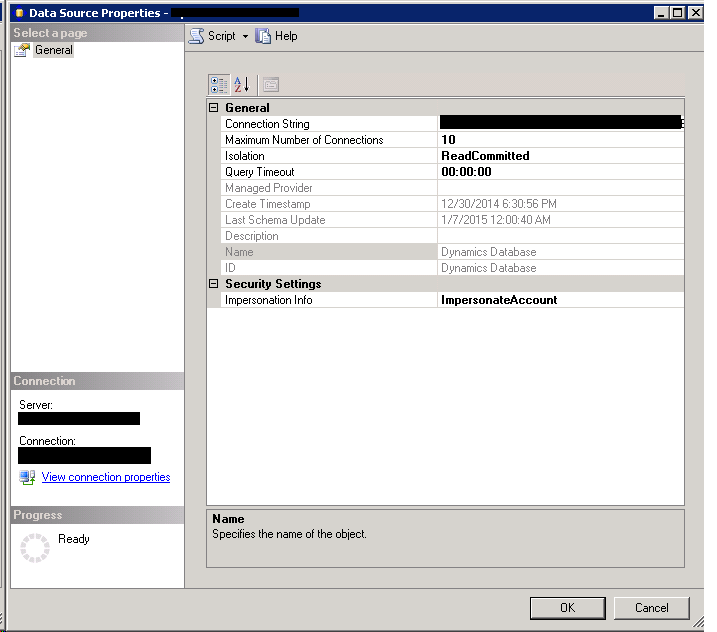
    I checked the cube and it had the wrong impersonation settings. I googled and found the issue hence echoing the same to all :D

    http://stackoverflow.com/questions/18702987/olede-error-login-failed-for-user-domain-computername-28000  

    In my case, the sql server analysis service login account was set local account which I think is not a good practice. And as default, the impersonation account is set to service account. Due to this, the impersonation was not working since local account (rendered as Domain\) did not had the required accounts on sql as a login. I provided a sql domain account and the error dissappeared :D. Snapshots for your reference


    Enterprise Portal Development Videos

    maqk® by Maqk | 3:05 PM

    I have just started EP development - and I never knew it was all the same - just that proxies adds minor of complexity

    And guess what - all my web dev xp is gonna get polished back

    EP comes with some very powerful and ready to use web parts. This post is however a 'LINKS' and not 'TUTORIAL' post, the latter will come by next year since every1 is going for holidays. 

    So without any delay, here they are, all videos, enjoy:

    • How do I videos - Enterprise Portal Development Series: 
      http://msdn.microsoft.com/en-us/dynamics/ax/cc507280.aspx
    • Videos at CustomerSource
      • Creating simple Enterprise Portal Lookups using EDT, DataSetField and custom lookups using DataSet or User Controls in Microsoft Dynamics AX 2012: http://mediadl.microsoft.com/mediadl/www/d/dynamics/customersource/CCAX2012HT0030_Enterprise%20Portal%20Lookup.wmv
      • Understanding record context when interacting with data in the Enterprise Portal for Microsoft Dynamics AX 2012: http://mediadl.microsoft.com/mediadl/www/d/dynamics/customersource/CCAX2012HT0029_Enterprise%20Portal%20Record%20Context.wmv
      • List page development in the Microsoft Dynamics AX 2012 Enterprise Portal: http://mediadl.microsoft.com/mediadl/www/d/dynamics/customersource/CCAX2012HT0031_Enterprise%20Portal%20List%20Page%20Development.wmv
      • Detail page development in the Microsoft Dynamics AX 2012 Enterprise Portal: http://mediadl.microsoft.com/mediadl/www/d/dynamics/customersource/AX2012CoreConceptsVideo_CCAX2012HT0032_EPDetailsPagesDev.wmv
      • Developing detail page interactions with Microsoft Dynamics AX 2012 Enterprise Portal, Part1: http://mediadl.microsoft.com/mediadl/www/d/dynamics/customersource/nCCAX2012DI0015_1_Enterprise%20Portal%20Details%20Page%20Interaction%20Patterns%20-%20Part%201.wmv
      • Developing detail page interactions with Microsoft Dynamics AX 2012 Enterprise Portal, Part2: http://mediadl.microsoft.com/mediadl/www/d/dynamics/customersource/CCAX2012DI0015_2_Enterprise%20Portal%20Details%20Page%20Interaction%20Patterns%20-%20Part%202.wmv
      • Debugging customizations and new development with the Enterprise Portal for Microsoft Dynamics AX 2012: http://mediadl.microsoft.com/mediadl/www/d/dynamics/customersource/CCAX2012HT0028_Enterprise%20Portal%20Debugging.wmv


    X++ - Cancelling the event / method in its Pre event handler

    maqk® by Maqk | 4:44 PM

    Eventing enables to extend applications as well to decouple the components and underlying implementations. It is a great way to write new logic without worrying a change in the underlying components.

    Automatic Event Handlers

    X++ provides custom delegates as well as Automatic event handlers
    • Pre - Occurs before
    • Post - Occurs after

    Pre Event Handler

    One of the responsibilities / usage of the Pre event handler is to validate if all conditions are correct for the commencement of the main method. Or to populate / fill any other component(s) which is required in the main method.

    Cancel Event

    This became a pain for me last night. I was trying to do something that we does in DotNet windows application :D 
    
    
    e.Cancel = true;

    Where is that ? Answer is, perhaps no where :P (educate me if I am wrong please)

    But there are alternates to it. Thanks to my ex colleague and friend Asim Saeed's blog post: Yes it is quite a natural alternate, simply throw an exception.

    Problem

    But that will end the whole program execution, unless caught in any catch and taken care there. What I mean is, consider a complex logic that spans multiple classes or methods. What if one of the optional method's Pre event handler simply throw's exception whereas the process should have continued. In such case, that particular event should be cancelled rather than the whole program flow. I want to have granular control here, only cancel the specfic event producer method, not the whole process 

    One way to do this is to have a flag parameter in the event producer method's parameters, set it to false in the Pre event handler on particular condition (i.e. if things are not found good to continue this event). Then at the start of event producer method, simply return out if the status flag is found to be false.

    To demonstrate the same, we have 2 classes,

    • CMaqkProducer_Event
      • With a method and its event handler subscription
    • CMaqkConsumer_Event
      • With event handlers registered to handle event subscription defined on the producer

    The code for the producer class is provided for our reference;

    Producer class: Maq_EventProducer


    class Maq_EventProducer
    {
        #PC
        //Macros for Product Configuration, carries #true and #false for sting to bool conversions
    }
    
    /// 
    /// This method is producing a Pre event handler
    /// 
    /// 
    /// A sample parameter passed to the method for
    /// 
    /// 
    /// Status parameter passed from XppPrePostArgs class containing the result from Pre event Handler
    /// 
    /// 
    /// We will return in the begining of this method if the results form Pre event Handler are not ok
    /// 
    
    public void method1(str _str, str _status = "")
    {
    
        if (_status == #false)
            return;
        // continue; ;)
        info("Maq_EventProducer.method1() called");
    
    }
    
    /// 
    /// Another method besides method1() 
    /// 
    /// 
    /// This method exists and is called to demonstrate continuation of program flow besides event cancellation
    /// 
    
    public void method2()
    {
        info("second method, Maq_EventProducer.method2() called");
    }


    Notice the line 'return;' at the begining of method1() after evaluating the _status defaulted value (string) value with #true. Using this theme, we cancel the whole event from progress.

    Consumer Class: Maq_EventConsumer


    class Maq_EventConsumer
    {
        #PC
        //Macros for Product Configuration
        
        Maq_EventProducer   objProducer; //Reference to producer
    }
    
    
    /// 
    /// parm method to access producer
    /// 
    /// 
    /// the reference variable to the event producer class object
    /// 
    /// 
    /// 
    /// 
    /// 
    /// 
    /// 
    
    public Maq_EventProducer parmObjProducer(Maq_EventProducer _objProducer = objProducer)
    {
        objProducer = _objProducer;
    
        return objProducer;
    }
    
    /// 
    /// The static main method
    /// 
    /// 
    /// arguments passed
    /// 
    /// 
    /// 
    /// 
    
    public static void main(Args args)
    {
        Maq_EventConsumer objConsumer = new Maq_EventConsumer();
        Maq_EventProducer objProducer = new Maq_EventProducer();
        objConsumer.parmObjProducer(objProducer);
        objConsumer.run();
    }


    /// 
    /// the default logic processing method of consumer class
    /// 
    /// 
    /// 
    /// 
    
    public void run()
    {
        info("Consumer class run() method called");
        this.parmObjProducer().method1("Maqk");
        this.parmObjProducer().method2();
    
    }
    
    
    /// 
    /// The pre Event Handler
    /// 
    /// 
    /// payload
    /// 
    /// 
    /// 
    /// 
    
    public static void preClass1_Method1(XppPrePostArgs _args)
    {
        info(strFmt("pre event handler called"));
    
        // Cancelling the event by setting the function's parameter, "_status" = 0
        _args.setArg("_status",#false);
    
        // other code logic body may go here
        // other code logic body may go here
    
        // Checking if some logic has asked to cancel the event
        if (_args.getArg("_status") == #false)
            warning("Class1 method1() event cancelled due to condition");
    
        // Later in the event producer method body, we will check the value and would work accordingly if found 0
    
    }


    Result


    Calling the consumer class's run() method calls both the methods of producer class. The snapshot below shows the program flow result.

    Results - Program flow continues only canceling the event

    The Pre Event Handler cancels the main event, but the program flow continues. Had we thrown error / warning in the Pre event handler, producer's method2() would not have been called. But now using the event payload (XppPrePostArgs) and having a default value parameter theme, we can only cancel the event we want to and not the whole program flow.
    top